MB
data
mins
texts
a month

Apple’s phones have faced an enduring problem, one that started with the iPhone 4S – which is when we originally wrote this (now substantially updated) article.
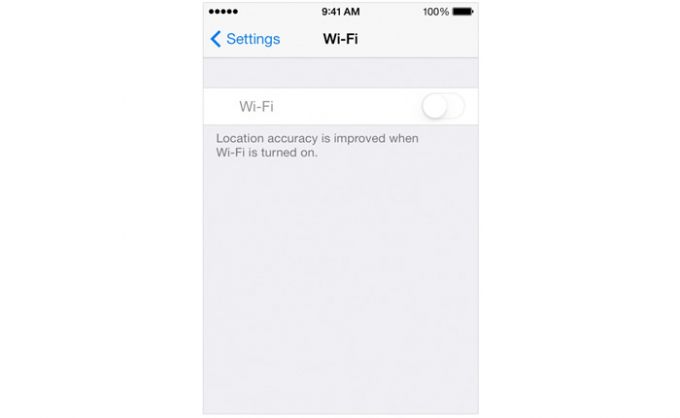
Back in 2013, Apple's support forums were inundated with users complaining that they could no longer activate Wi-Fi on their Apple device. The problem, which mainly affected the iPhone 4S, caused the setting to turn-on Wi-Fi to appear "greyed out" or “dim".
It’s a problem that Apple was quick to address with various possible solutions, but these didn’t work for everyone. Members of the public meanwhile came up with their own solutions with mixed success.
And while the iPhone 4S appears to be the worst affected handset, a number of users of much newer iPhones have reported the same issue in the years since it first emerged. If you’re one of them, here’s how to solve it.
Apple acknowledged the problem back when it was rife on the iPhone 4S and posted a potential solution for those suffering from the issue. The solution involves resetting networking settings and, if all else fails, doing a full software reset in iTunes - suggesting that it's a software problem.
The steps provided can be found below. Note that while these steps were aimed at the iPhone 4S, they should still apply on newer models (and software), and the process for carrying them out should be the same too. The steps are as follows:
Verify that airplane mode is off by tapping Settings > Airplane Mode.
Reset the network settings by tapping Settings > General > Reset > Reset Network Settings.
Note: This will reset all network settings, including Bluetooth pairing records, Wi-Fi passwords, VPN, and APN settings.
Ensure that your device is using the latest software. To do so, connect your device to your computer and check for updates in iTunes.
If your issue is still unresolved, perform a software restore in iTunes.
Failing that, Apple advised users still unable to turn Wi-Fi on to "Contact Apple for support and service options".
That advice should also still apply, and those whose device is still in warranty should be able to get it replaced or fixed free of charge. However, if your device is outside Apple's warranty period then you may have to pay for it to be fixed, or buy a replacement model.
Some users reported that Apple's fix resolved their problems, but others claimed it hadn't done the trick. Those still suffering from the problem believed that the iOS 7 update had unearthed a hardware defect inherent in the iPhone 4S.
One user on Apple's support forums added that "The problem always existed in the device, because the device was defective, but that defect was not revealed until the HEAT that is produced as a byproduct of the update process caused the wi-fi chip to fail."
It was never fully confirmed whether this was the case or not, but iFixit concluded that the problem was caused by thermal shock, and for the handy among you has posted a permanent solution.
The site adds that if this is your issue then putting the phone in a fridge for 15 minutes or under a lamp for 30 minutes may temporarily solve the problem. However, you do so at your own risk and we advise users to contact Apple support before doing anything.
Since this problem first emerged, other iPhone models have reportedly had the same problem, including the iPhone 5, iPhone 6, iPhone 7, iPhone 8, and iPhone X ranges, and two potential causes have been highlighted by users.
One cause seems to be software updates, just as it was with the iPhone 4S. The iOS 13, iOS 12, iOS 11.4, and iOS 11.3 updates in particular have been reported as causing the issue for some users.
If that’s the case for you, and a subsequent software update hasn’t fixed the issue, then the advice given by Apple above is your best chance of fixing it.
One other potential cause may be water damage, or dust affecting the antenna. If you have an iPhone with a headphone port it’s worth shining a light into it to look for any sign of debris. On the iPhone 4S and iPhone 4 you should also be able to see a white dot by doing this, but if it’s red, that means water has got in and is likely the cause of the problem.
There’s no easy fix for that, short of sending your iPhone off to be repaired, but if you see debris you may be able to remove it with a clean toothbrush or an anti-static brush, and that might fix the problem.